Visual regression testing compares screenshots of your pages with approved images and fails when pixels change. Rendered-UI linting opens the page in a browser and checks it against rules, such as text that doesn't fit, contrast below 4.5:1, or content nobody can scroll to, with no baseline. They answer different questions. Visual regression asks "did this change?". A rendered-UI linter asks "is this wrong?".
- Use visual regression to protect a design you have approved from unintended change.
- Use a rendered-UI linter for pages nobody has approved yet, and for defects that appear at widths and with data your screenshots never used.
- They don't compete. You can run both.
What does visual regression testing do?
You capture a screenshot of each page or component, store it as the baseline, and on later runs capture it again and compare. If the difference is over a threshold, the test fails and a person looks at the diff. Percy and Chromatic are hosted services built around this review step. BackstopJS keeps reference images on disk, usually committed with your code, and compares against them (backstop reference, then backstop test). Playwright's toHaveScreenshot() does the same inside your test runner, with options such as a pixel-difference threshold.
This is excellent at one thing: telling you that something moved. A designer approved a page, a refactor changes a margin by 4px, and the diff shows it.
What does a rendered-UI linter do?
It renders the app in headless Chromium at several widths, measures it, and applies rules. renderlint measures the rects of every text run against their containers and clip boxes, tests overlap and occlusion with elementsFromPoint, reads computed styles, and for contrast captures the page twice, once normally and once with all text transparent, to read the real background behind each glyph. Then it reports each defect with the element, the source file, an annotated screenshot and a fix.
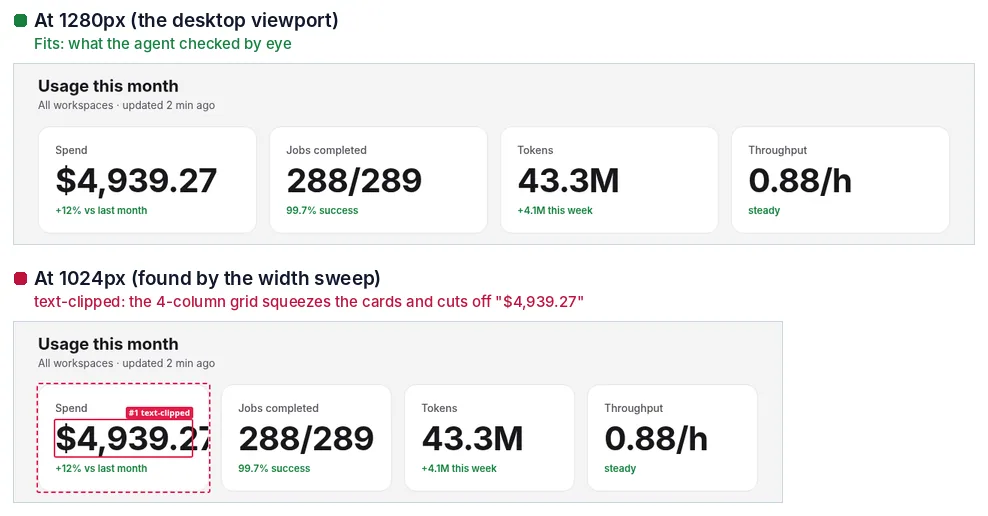
Caption: A layout that is fine at 1280px and cut off at 1024px. renderlint boxes the failing value and reports the width.
How do they compare?
| Visual regression (Percy, Chromatic, BackstopJS, Playwright screenshots) | renderlint | |
|---|---|---|
| What it reads | Pixels, against approved images | Rendered geometry and pixels |
| Needs a baseline | Yes | No |
| Finds a defect in a page nobody has approved | No: the first version becomes the baseline | Yes |
| Overflow, overlap, clipping | Only as a diff from the baseline | Yes, at every width and with stressed content |
| Contrast over gradients and images | Only as a diff | Yes, from the real pixels behind each glyph |
| Tells you the fix | No: shows what changed, not what's wrong | Yes: element, source file, screenshot and fix |
| Catches "someone changed the design" | Yes | No |
| Intentional redesign | Update the baseline | Nothing to update |
| Works on canvas charts | As pixels, against a baseline | No: canvas labels are pixels the DOM doesn't describe |
The row to look at is the third one: a defect in the first version becomes the baseline. If a page ships with white text on a light gradient and someone approves the first screenshot, every later run agrees with it. The tool is working correctly. It was never asked whether the page was right.
For comparison with other tools: ESLint, stylelint and TypeScript read source code and can't see rendered overflow. axe-core and Lighthouse read the DOM and computed CSS, catch no overflow or overlap, and report contrast over gradients and images as "needs review". renderlint doesn't replace those. It covers the gap between "the code is valid" and "the page looks right".
When do baselines help?
- Approved design, stable page. A marketing page the design team signed off, a component library, a checkout. You want any change to be a conscious one.
- Refactors. Swapping a CSS framework or upgrading a UI library should change nothing visible. A diff proves that.
- Browsers other than Chromium. renderlint renders in headless Chromium only. If you need other engines compared, that is a job for a tool built for it.
- Review. A diff that a designer can approve in a pull request is a workflow a linter doesn't have.
When do baselines fail you?
What happens when the first version is already broken?
It becomes the baseline. This is the case for any code an AI coding agent wrote in the last hour: nobody has approved the page, and the first screenshot is whatever came out. In the renderlint experiment (22 headless Claude Code sessions), the 11 baseline apps had 229 errors, mostly WCAG contrast failures. A baseline taken from any of them would have frozen those failures in. See how to catch UI bugs written by AI coding agents.
Why are screenshot diffs flaky?
Several things differ between runs and have nothing to do with your change: font loading and anti-aliasing, animations caught mid-frame, lazy content, scroll-reveal sections, timestamps and live data, a hover state, ad slots. The usual answer is to freeze the clock, mock the data, disable animations, wait for fonts, mask regions, and raise the diff threshold. Every one of those reduces what the test can see. renderlint waits for fonts and images, scrolls to trigger lazy content, and jumps animations to their final state before measuring. It also measures rects and pixels behind text against rules, rather than comparing whole images with a baseline.
How many widths and content variants do you really screenshot?
A baseline covers the viewport and data you captured. A layout that breaks only at 1024px, or only when a name is 40 characters long, shows up in a screenshot suite only if you took that screenshot, and the baseline for it has to be approved first. renderlint re-runs its layout rules at 13 widths from 320 to 1920px and on both sides of every breakpoint the page uses, then with 50% longer text, 36+ character words with no break points, three more digits on numbers, declared worst cases (data-renderlint-maxlength="60") and longer API data. Anything that only breaks under stress becomes a fragile-layout warning.
Does a diff tell you what to fix?
It tells you what changed. A red region says "these pixels differ", and someone works out why. A renderlint finding says what is wrong, where, and what to try:
  error Text is cut off by an overflow:hidden container (12px past the right edge).
        at div.kpis > div.kpi:nth-of-type(1) > div.v  "$4,939.27"
        page /usage · at 1024px · see .renderlint/screens/usage@1024.png #1
That example comes from renderlint's own documentation, not from one of the captured runs. A contrast finding adds a fix line, for example use text #2e2e2e (currently #ffffff on #459bf4).
What can a linter find that no diff would?
Defects that are the same in every version:
| Defect | Rule |
|---|---|
| Text running past its card, button or badge | text-overflow, text-clipped, text-crowding |
| Contrast below WCAG AA on gradients and images | contrast |
Content painted below an overflow: hidden app shell that never became a scroller |
unreachable-content (renderlint turns the mouse wheel to make sure) |
| A dropdown opening behind the next card | popup-obscured |
| A page that stays blank while its data loads | loading-state |
| A page that only showed the login form | auth-required |
undefined, NaN, Invalid Date in a tile |
placeholder-text |
Some of these can't be a screenshot test at all. popup-obscured opens each menu, which a static screenshot of the closed page never shows. loading-state holds the page's fetch and XHR requests for a second, because on a fast dev machine the page never looks blank. auth-required is about a page the screenshot never reached.
What can't renderlint do?
Being fair means saying where a baseline tool wins or renderlint stops:
- It can't tell you a page is ugly, off brand, or different from the mock-up. It has no design reference.
<canvas>charts (Chart.js, ECharts in canvas mode) are pixels, so renderlint can't inspect their labels. A screenshot diff sees them, as pixels.- Contrast follows WCAG 2 AA math. It doesn't model font weight beyond the large-text rule, and doesn't apply APCA.
- Pages are checked as they load, with each menu opened. Dialogs, tabs and filled forms are rendered and judged by
--ux, but their layout is only linted when you list them instatesor reach them in a Playwright test. - A run takes about 4 to 10 seconds per page at three viewports with the sweep and stress passes.
--sweep 1024or--no-sweepgives a faster inner loop.
It is also tuned for a low false-positive rate, so it leaves alone what is usually intentional: text-overflow: ellipsis, line-clamp, screen-reader-only text, closed accordions, off-canvas menus, carousels, scroll areas and modals. Anything on purpose can be marked data-renderlint-ignore with a reason.
Can you use both in CI?
Yes, and they don't need to know about each other. A reasonable split:
- Every PR: run the linter. It needs no baseline, so there is nothing to approve. Exit code 1 means errors.
npx renderlint --format githubannotates the PR. - Stable, approved pages: add screenshot comparison for the pages and components where unintended change matters.
- The two meet in Playwright. If your e2e tests already use
toHaveScreenshot(),withRenderlint(test)checks each state those tests reach, so a state is both diffed and linted.
# every pull request: no baseline needed
npx renderlint --format github

# fail when routes go unchecked
npx renderlint --min-coverage 100
How renderlint catches it
In this comparison renderlint is the second tool: it looks at the rendered page rather than at a change. Geometry rules find text that doesn't fit, contrast reads the real pixels behind each glyph, the stress passes find what breaks only with other widths or data, and unreachable-content and popup-obscured interact with the page (the mouse wheel, opening menus). The checks and their limits are in the rules reference and the examples. On a page that already passes, there is nothing for it to report, and then a baseline tool is what tells you the page later changed.
Frequently asked questions
Is renderlint a replacement for Percy, Chromatic or BackstopJS?
No. It doesn't compare against approved images and can't tell you a page changed. It finds defects in a page without one.
Can a visual regression test catch contrast or overflow?
Only if the baseline already showed a correct page, and only as a diff. A defect present from the start is part of the baseline.
Do I need a baseline for renderlint?
No. Rules run on the rendered page. Tell it about intentional cases with data-renderlint-ignore and a reason.