AI coding agents write valid code and never see the page it draws, so they ship visual bugs that TypeScript, ESLint and unit tests can't detect: low-contrast text, clipped chart labels, a layout that breaks at 320px. The fix is a check that renders the app in a real browser, reports each defect with a concrete fix, and blocks the agent from finishing until the errors are gone. In the renderlint experiment, 11 baseline apps had 229 errors between them, and the 11 apps built with renderlint finished at 0.
- Agents can't judge pixels from code, so contrast and overflow slip through.
- A plain-text report with element, source file and fix is something an agent can act on.
- A Stop hook (Claude Code) or
AGENTS.mdinstructions (other agents) make the check automatic. - The check has to be narrow and quick, or agents skip it.
Why do AI coding agents ship visual bugs?
The agent writes a component, the build passes, the types pass, and the agent reports success. Nothing in that loop looks at the result. The code is fine. The pixels are wrong.
Some of what goes wrong:
- Contrast. A muted gray caption, an orange-600 label on white, white text on a light accent color, chart axis ticks, text on a gradient. These are hard to see in review on a good monitor.
- Text that doesn't fit. A long email running off a card, a price cut off at 1024px, donut-chart labels clipped by the SVG edge on a phone.
- Emoji as icons. Rocket and sparkle characters where an icon set belongs.
- Layouts tuned to the sample copy. Fine with "Acme Inc", broken with a real 40-character name.
None of this is a syntax or type problem, so none of the usual gates fire. That is the gap between "the code is valid" and "the page looks right".
What happened when agents checked their own UI?
renderlint ran headless Claude Code sessions (claude -p), each vibe-coding a frontend from one prompt. There were 22 sessions on Opus and Haiku, building landing pages, dashboards, a kanban board, a weather app, an SVG org chart and analytics charts in HTML, React, Next.js, Vue and Svelte. Half also got a one-line setup prompt.
| Measure | Baseline apps (11) | Apps built with renderlint (11) |
|---|---|---|
| Errors at the time of the experiment | 229 | 0 |
| Errors rescored later with the newer checks | 225 | 11, in 5 apps |
The numbers behind that, from the published results:
- The 11 baseline apps had 229 errors, mostly WCAG contrast failures, plus emoji icons and clipped chart labels.
- All 11 apps built with renderlint finished at 0 errors, because the agents fixed the issues themselves.
- Rescoring with the width sweep, stress profiles and form rules later gave 11 errors in 5 of the renderlint-built apps, against 225 for the baselines. Every new finding was checked by eye. 9 of the 11 only appear at 320 or 360px, narrower than the 375px viewport the agents had been checking, and the other 2 are
dropdown-arrowon native selects. None was checkable when the sessions ran.
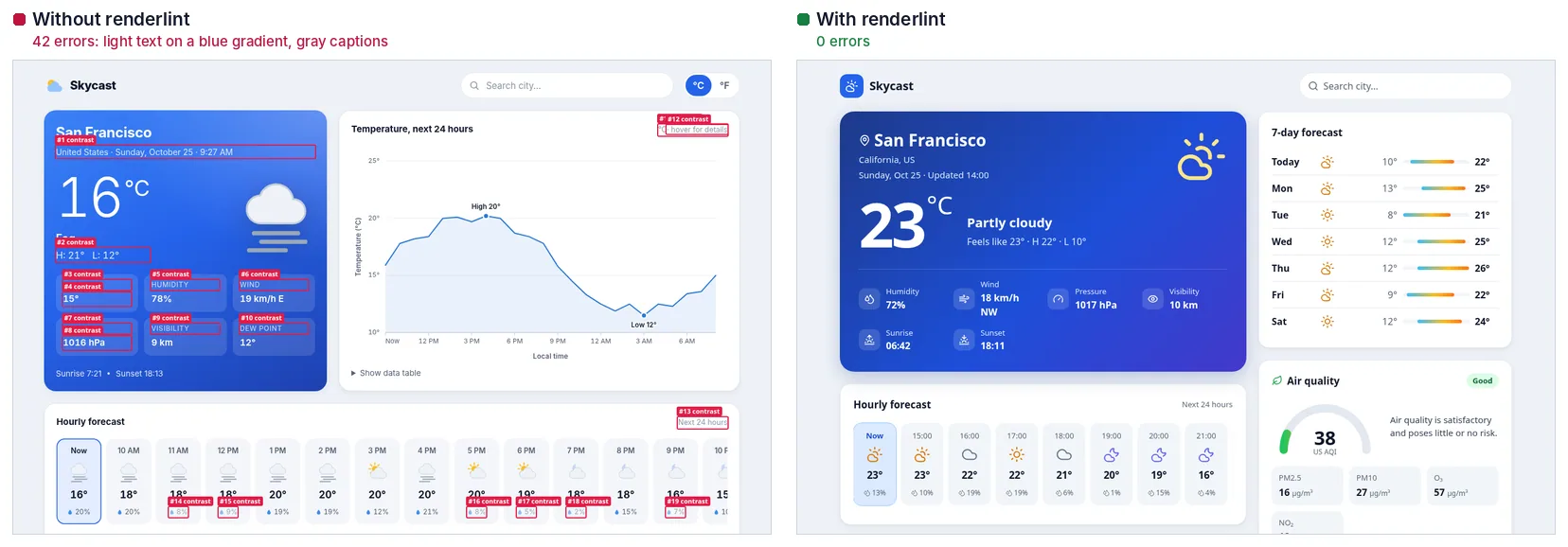
Caption: The same weather-app prompt in two sessions. Left: no renderlint, 42 errors (its annotated report). Right: the session that ran renderlint and fixed its own findings.
Two other observations are worth repeating. The models mostly got layout right but failed contrast all the time: in every Opus baseline, almost all the defects were contrast failures. And once the agent had numbers (2.66:1, needs 4.5:1 — #ffffff on #459bf4) and a suggested color, it fixed them in one pass. The experiment also surfaced bugs in renderlint itself, which were fixed, and one false positive the Svelte agent handled by suppressing it with data-renderlint-ignore and a written reason.
This is one set of prompts, one tool, and a count of errors that the same tool defined. It shows that agents act on this kind of report. It doesn't prove the apps are free of every visual defect.
What does an agent-friendly report look like?
An agent needs the element, where it lives in the source, and what to change, as plain text. This is a real finding from the weather-page example:
✖ contrast (10)  Text does not have enough contrast with what is actually behind it (WCAG AA: 4.5:1, or 3:1 for large text). Measured from real rendered pixels, so it works over gradients and images.
  error Low text contrast: 1.64:1, needs 3:1 — #ffffff on a non-uniform background (≈#9bd0fc).
        at main > section.hero > h1  "Lisbon, 21°"
        page /contrast-before.html · all viewports · see .renderlint/screens/contrast-before-html-eaveh@375.png #1
       fix use background #7096b5 (currently #ffffff on #9bd0fc)
Each run also saves annotated screenshots with each finding boxed and numbered, so an agent with vision can look at what is wrong.
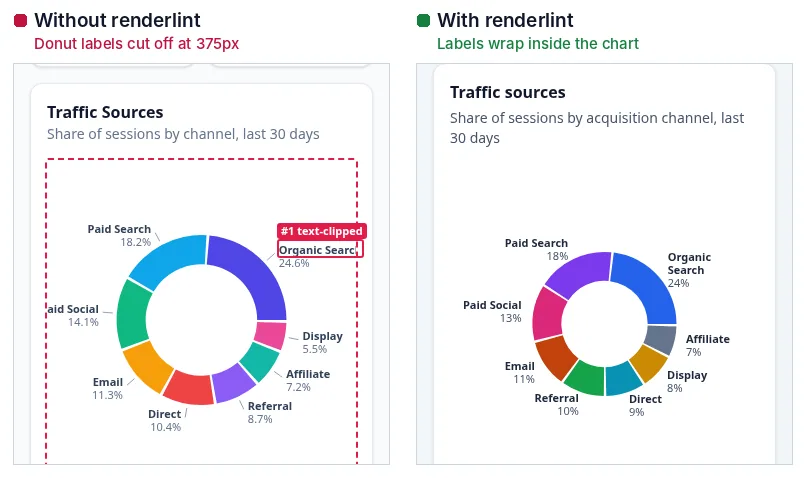
Caption: A real Haiku session: donut labels clipped on phones, then fixed.
How do you make Claude Code check its UI every time?
Install a Stop hook. npx -y @yitec/renderlint init adds one to .claude/settings.json (--no-hook skips it). It runs npx renderlint hook when Claude is about to end a turn. If errors remain, the hook prints the report to stderr and exits with code 2, which makes Claude keep working instead of stopping.
How the hook behaves:
| Behaviour | Detail |
|---|---|
| Runs only when UI files changed | It fingerprints UI files (HTML, JSX/TSX, Vue, Svelte, Astro, CSS and similar, plus templates) by modified time and size, and skips folders such as node_modules, dist and .next. No change since the last clean run, or no UI files touched this turn: it exits 0. |
| Blocks with exit code 2 | The message says the agent is not done, to fix every error in the source, and not to silence a finding to get done. |
| Gives up after 4 attempts | After 4 blocks in a row it prints how many errors remain and lets Claude stop, telling it to report the unresolved defects. It can't trap the agent. |
| Never traps on its own failures | If renderlint can't run (no server, an internal error), it prints a note and exits 0. |
| Re-checks only affected routes | After a full run it knows which files each route renders. It re-checks the routes an edit can affect, plus any route that still had errors, and says so (for example, "re-checked 3 of 46 route(s) affected by 1 changed file(s)"). |
On a 46-route Next.js app, an edit to one component re-checked 3 to 9 pages in 6 to 17 seconds, global CSS re-checked 46 pages in 79 seconds, and a full run took 167 seconds. Across 30 typical edits the hook missed no page whose rendering changed. An edit to global CSS, the layout or a shared module re-checks every route.
The message also says how to ignore something, but only if the user wants it that way: data-renderlint-ignore="<rule>" and data-renderlint-reason="…" on the element, or a // renderlint-ignore <rule> -- <reason> comment above a source line.
What about Cursor, Codex, Copilot and other agents?
The Stop hook is installed for Claude Code only. For other agents the workflow goes into instructions. init writes a "UI quality gate: renderlint" section into AGENTS.md, which Codex, Cursor, Copilot, Gemini CLI, Amp, Zed and others read, and creates CLAUDE.md importing it. The section tells the agent to run npx renderlint after UI changes, fix every error, never hide symptoms, and read the matching skill before setup or fix work.
init also installs three skills in .claude/skills/, plain Markdown any agent can read:
| Skill | What it covers |
|---|---|
renderlint-setup |
Making every page and role checked: sign-in, roles, mocks, dynamic route params, coverage gaps |
renderlint-fix |
Fixing findings at the root, rule by rule, and marking intentional cases with a reason |
renderlint-e2e |
The Playwright fixture, Storybook stories, MSW handlers and HAR recordings |
If your agent reads .cursorrules, .github/copilot-instructions.md or GEMINI.md instead, copy the section there or point those files at AGENTS.md.
What is the one-line setup prompt?
Paste this into the agent:
Set up renderlint in this project: run
npx -y @yitec/renderlint init, then follow the "UI quality gate: renderlint" section it adds to AGENTS.md: after every UI change runnpx renderlintand fix every reported error until it shows 0 errors.
The experiment's second condition added a similar sentence to the prompt. Running init again is safe: it updates skills it installed and leaves ones you edited alone.
Should you also check at build time and while coding?
Yes, with different tools for different moments. In CI, npx renderlint --format github gives inline PR annotations, and init appends a check to your build script, such as vite build && renderlint dist. During development, the Vite plugin shows a live overlay that links each finding to its component file and line.
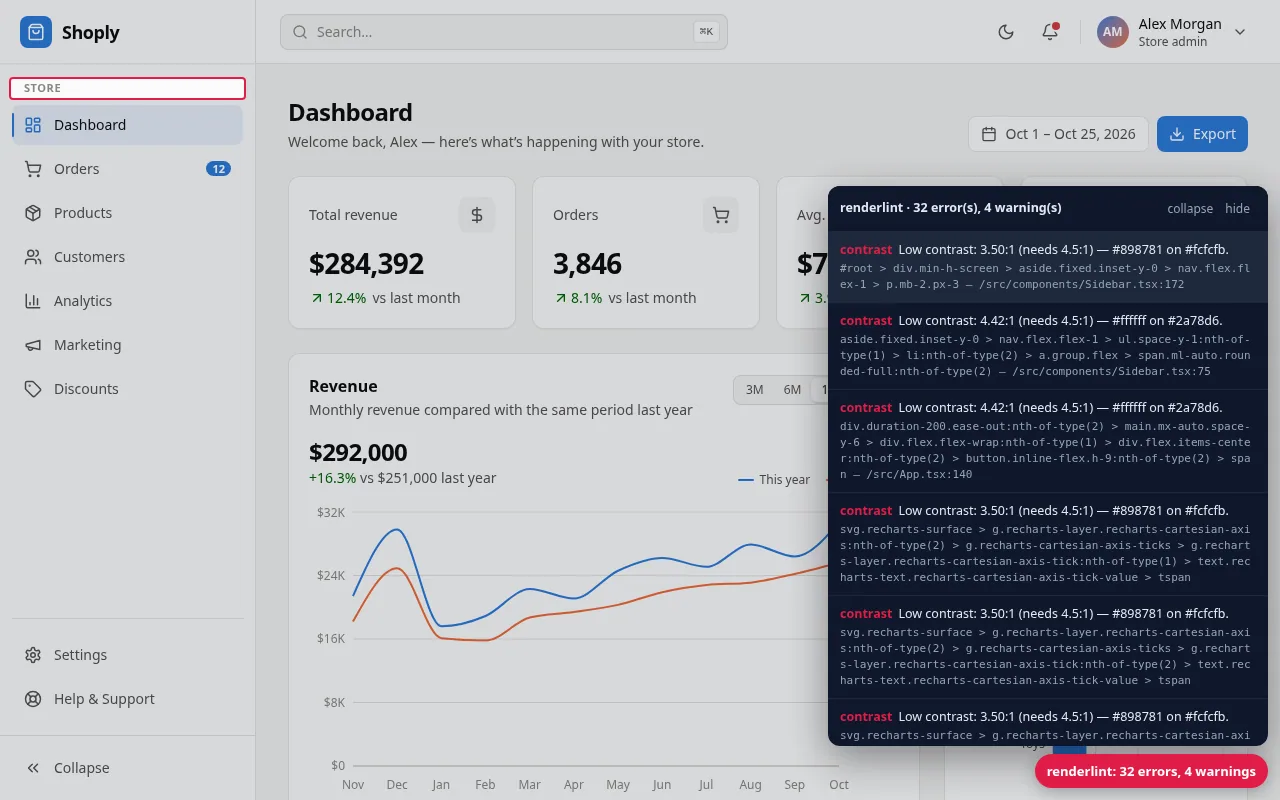
Caption: The Vite plugin's overlay: hover a finding to highlight it.
How renderlint catches it
The defects agents ship come from a few rules. contrast captures the page twice, once normally and once with all text transparent, so it reads the real background behind each glyph, including gradients and images. text-clipped and text-overflow compare the rects of every text run with its containers and clip boxes, including SVG chart labels. fragile-layout re-runs the layout rules at 13 widths from 320 to 1920px and with longer text, long words, bigger numbers and longer API data, and reports what only breaks under stress. emoji scans the rendered DOM and source files. See rules and the text overflow guide.
Limits: <canvas> charts are pixels, so their labels can't be inspected. Contrast follows WCAG 2 AA and doesn't apply APCA. A single page takes about 4 to 10 seconds at three viewports with the sweep and stress passes, so use --sweep 1024 or --no-sweep for a faster inner loop. Pages behind a login need auth (how to test every route and role). An agent can still add an ignore, which is why the instructions require a written reason and reviewers should read ignores like an eslint-disable.
Frequently asked questions
Does the hook slow the agent down?
Only when UI files changed, and after a full run it re-checks only the routes an edit affects. A page takes about 4 to 10 seconds with the sweep and stress passes.
Can the hook get the agent stuck in a loop?
No. It gives up after 4 blocks in a row and tells the agent to report what is unresolved.
Do agents just add ignore comments?
The instructions tell them to fix root causes first and to add a reason when they ignore something. Review ignores in the diff.