Unreachable content is content that is rendered but that no one can scroll to. It happens when a box clips its overflow (overflow: hidden), nothing inside or around it scrolls, and the content is taller than the box. The page looks complete, there is no scrollbar and no error, and everything below the edge of the screen simply does not exist for the user. The usual causes are a height: 100vh; overflow: hidden app shell whose inner area never became a scroller, a scroll lock that was never released, and fixed-height cards.
- The content is in the DOM and painted, so tests that look for it pass.
- No error is raised, and at a short list length the page looks right.
- It appears when the data grows: a short list fits, a long one doesn't.
- The fix is to make exactly one area the scroller, and let it shrink to the space it has.
Why can't users scroll to some content?
Scrolling needs a scroll container: a box with overflow: auto or scroll whose content is taller than its height. overflow: hidden creates a box that clips but gives the user no scrollbar and no wheel or touch scrolling. The clipped part is simply out of reach. (A script, or keyboard focus moving into the box, can still scroll it, which is why a visible clip does not always mean lost content.)
An app shell makes this easy to do by accident. The shell is given the height of the window so the sidebar and header stay put, and the content area is meant to scroll inside it. If the content area is overflow: hidden, or is a flex item that grew past its parent, nothing between the content and the screen is a scroller. The page itself doesn't scroll either, because the shell is exactly one screen tall and clips the rest.
The common causes
| Cause | What you wrote | What happens | Fix |
|---|---|---|---|
| Shell with no scroller | .app { height: 100vh; overflow: hidden } and the content area has overflow: hidden |
Everything past the first screenful is clipped | overflow-y: auto on the content area |
| Flex or grid child grows | A flex child with flex: 1 and long content, no min-height: 0 |
The child's minimum height is its content's height, so it grows past the shell instead of scrolling | flex: 1 1 0%; min-height: 0 on the child |
| Scroll lock left on | body { overflow: hidden } set when a menu or modal opened, not removed when it closed |
The page can't scroll at all | Remove the lock when what set it closes |
| Fixed-height card | .card { height: 320px; overflow: hidden } around a list |
The list's remaining rows are hidden | Remove the height, or make the card's list the scroller |
| Tall modal on a phone | A dialog taller than the screen with no scrolling | The buttons at the bottom are below the screen | max-height: 100dvh and overflow-y: auto on the dialog body |
Why does flex need min-height: 0?
A flex item's automatic minimum size is its content size. In a column flex container, a child with long content will not shrink below that content's height, so flex: 1 does not make it fit: it grows, and its parent clips it. Setting min-height: 0 removes the content-based minimum, and then overflow-y: auto has a height to scroll within. Grid rows behave the same way, and the fix there is min-height: 0 on the row's item or minmax(0, 1fr) for the track.
.app    { display: grid; grid-template-columns: 200px 1fr; height: 100vh; overflow: hidden; }
.mainc  { display: flex; flex-direction: column; min-height: 0; }
.screen { flex: 1 1 0%; min-height: 0; overflow-y: auto; }  /* the one scroller */
Is 100vh itself a problem on phones?
It can be. On mobile browsers, 100vh is the height of the viewport with the address bar hidden, so a shell sized with it can be taller than the visible area while the bar is showing. 100dvh (dynamic viewport height) follows the visible area. Use height: 100dvh for the shell, and keep a 100vh fallback line above it for older browsers.
What does it look like in a real app?
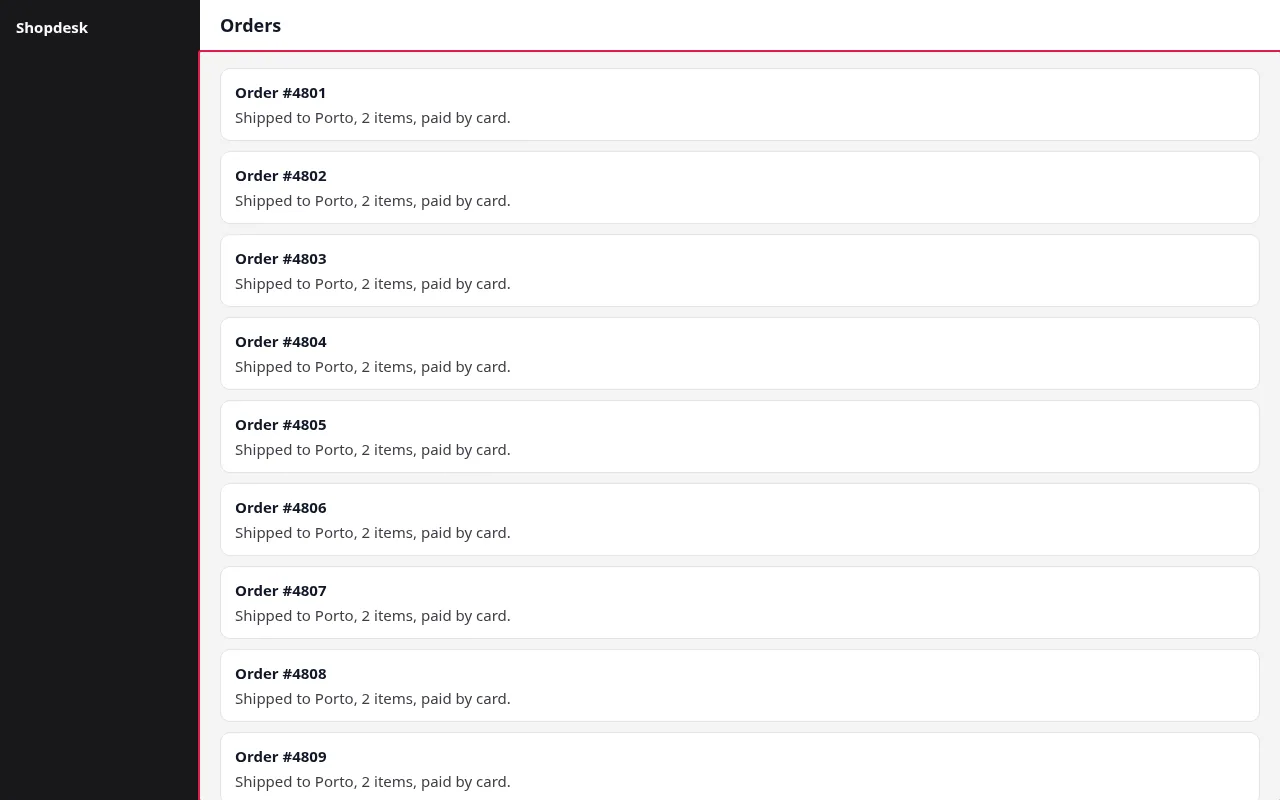
Here is a small order-management page: a sidebar, a header and a list of 24 orders. The shell is height: 100vh; overflow: hidden, and the area holding the orders is a flex column with overflow: hidden too. It was checked at 375, 768 and 1280px; the screenshot below is the 1280px one.
The markup and CSS of the broken area:
.app    { display: grid; grid-template-columns: 200px 1fr; height: 100vh; overflow: hidden; }
.mainc  { display: flex; flex-direction: column; overflow: hidden; min-height: 0; }
.screen { flex: 1; display: flex; flex-direction: column; overflow: hidden; min-height: 0; padding: 16px 20px; }
.panel  { display: flex; flex-direction: column; }
Here min-height: 0 is already in place. The missing piece is the scroller: .screen is overflow: hidden, so it clips the panel instead of scrolling it. Both halves of the fix are needed in general, but a page that has one and not the other is broken in the same way.
This is the report from the run, copied exactly:
renderlint — 1 page(s) × viewports 375px, 768px, 1280px

✖ unreachable-content (1)  Content lies below the bottom of a box that clips (`overflow: hidden` or `clip`), or below the screen on a page that doesn't scroll, and nothing around it scrolls: users can never see it. Typical causes: a fixed-height app shell (`height: 100vh; overflow: hidden`) whose page or tab area isn't a scroller, or a scroll lock (`body { overflow: hidden }`) left on. Before reporting, renderlint turns the mouse wheel over the box: content that a script scrolls is not reported. Not reported: content moved away on purpose (transformed, absolute or fixed), small boxes (teasers, collapsed panels), boxes with a "Show more" control, faded or line-clamped text, and the page while a dialog is open.
  error Content can't be scrolled to: 30 pieces of text, reaching 1224px below the bottom of this box (overflow-y: hidden), and neither it nor anything around the content scrolls ("Order #4810", "Shipped to Porto, 2 items, paid by card.", "Order #4811").
        at div.app > div.mainc > section  "Order #4801 Shipped to Porto, 2 items, paid by card. Order #4802 Ship…"
        page /unreachable-before.html · all viewports · see .renderlint/screens/unreachable-before-html-29ad6@375.png #1

How to fix
  unreachable-content: Make the area that grows scroll: `overflow-y: auto` on it, and in a flex or grid layout let it shrink to the space it has (`flex: 1 1 0%; min-height: 0`, or `min-height: 0` on the grid row) so it doesn't just grow past its parent. Or remove the fixed height so the page scrolls. Remove a scroll lock when what set it closes.

If a finding is intentional, mark the element: data-renderlint-ignore="<rule>" (space-separated, or empty for all rules), or in CSS: --renderlint-ignore: <rule>; — both apply to the element and its descendants. Add data-renderlint-reason="…" to explain why.

✖ 1 error(s), 0 warnings · screenshots in .renderlint/screens
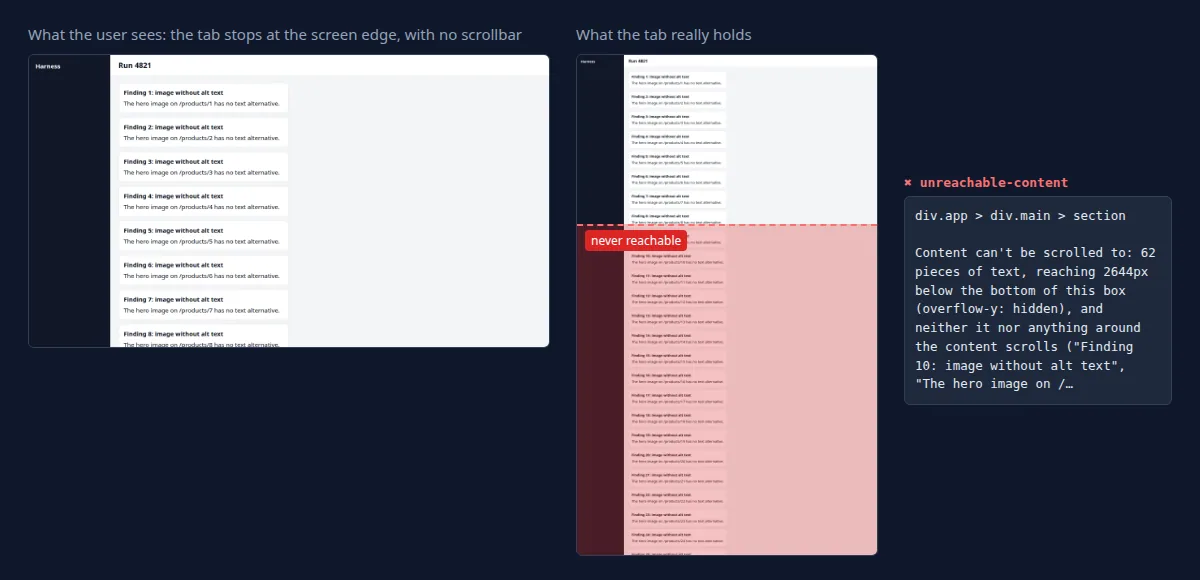
The finding names the box (div.app > div.mainc > section), the property that clips it (overflow-y: hidden), how far the content goes past the bottom (1224px) and which text is lost. The three quoted strings are examples of the lost text, not the full list.
The fix is one line of intent: the content area becomes the scroller.
/* before */
.screen { flex: 1; display: flex; flex-direction: column; overflow: hidden; min-height: 0; padding: 16px 20px; }

/* after */
.screen { flex: 1 1 0%; min-height: 0; overflow-y: auto; padding: 16px 20px; }
Run again, the page is clean:
renderlint — 1 page(s) × viewports 375px, 768px, 1280px
✔ No UI defects found.
What about scroll locks and tall modals?
A scroll lock is a way of stopping the page from scrolling behind an open menu or modal: document.body.style.overflow = 'hidden', or a class that does the same. The bug is not the lock, it's the code path that skips the release: the modal is closed by Escape, by a route change, or by an unmount, and the cleanup that restores overflow never runs. The page is then stuck at whatever was on screen when it happened.
// Restore what was there before, and do it in every close path
function lockScroll() {
  const prev = document.body.style.overflow;
  document.body.style.overflow = 'hidden';
  return () => { document.body.style.overflow = prev; };
}

// React: the cleanup runs on unmount, Escape, route change, everything
useEffect(() => (open ? lockScroll() : undefined), [open]);
A tall modal has the opposite problem: the dialog is meant to hold its own scroll, and on a phone it is taller than the screen. Give the panel a height limit and a scroller:
.modal-panel { max-height: 100dvh; display: flex; flex-direction: column; }
.modal-body  { overflow-y: auto; min-height: 0; }
Keep the title and the action buttons outside .modal-body so they stay in view.
How renderlint catches it
unreachable-content is an error by default. The rule looks for content lying below the bottom of a box that clips (overflow: hidden or clip), or below the screen on a page that doesn't scroll, where nothing around it scrolls. It reads rendered geometry, so it does not depend on how the CSS got there: a shell, a scroll lock or a fixed-height card all show up the same way.
The part that keeps it quiet is the mouse-wheel check. Before reporting a box, renderlint turns the mouse wheel over it. If something scrolls, the content is reachable and is not reported. That covers custom scrollbars and scroll-jacking pages, where a script moves the content and the CSS alone looks like a clip.
What it deliberately does not report:
- content moved away on purpose (transformed, absolute or fixed);
- small boxes such as teasers and collapsed panels;
- boxes with a "Show more" control;
- faded or line-clamped text;
- the page while a dialog is open.
When a clipped box's bottom edge also cut text, the text-clipped finding for it is folded into this one. When it was added, it was run on 99 benchmark pages and the 50 existing test targets and reported nothing new on any of them, which is the false-positive check that matters for an error-level rule.
One limit worth knowing (see the documented limitations): pages are checked as they load, with each menu opened. Dialogs, tabs and filled forms are rendered by --ux, but their layout is only linted when you list them in states or reach them in a Playwright test. So a tall modal is not checked unless you take the page to that state. See the rules reference, and the examples for more.
Frequently asked questions
Why doesn't the page scroll when the content is taller than the window?
Because something clips it. Either the shell is height: 100vh with overflow: hidden, or html and body have overflow: hidden (a scroll lock). The page scrolls only if the document is taller than the viewport and neither html nor body is clipping.
Is it a problem if a box clips but has a "Show more" button?
Not for renderlint: boxes with a "Show more" control are not reported, because the user has a way to the rest.
Does overflow: auto on the content area always fix it?
It needs a height to scroll within. In a flex or grid layout that means min-height: 0 as well, or the area grows past its parent and the parent clips it.